Help! My V480 Flash Is Stuck on My Camera – What Do I Do?
If you are trying to take your V480 speedlight off your camera and it won’t budge—even after unscrewing the lock ring—stop immediately.
Do not shake it, and definitely do not force it. Forcing the flash off can rip the entire hot shoe mount off your camera body, turning a small accessory repair into an expensive camera repair.
This issue is usually caused by a mechanical failure inside the flash's foot, where the metal "locking pin" fails to retract when you loosen the lock ring.
Here is how to remove it safely and fix it permanently.
The Emergency Fix: Removing the Flash with Tweezers
If the locking ring is loose but the flash is still stuck, follow these steps to manually disengage the lock:
1、Get the right tool: You will need a pair of tweezers.
2、Locate the pin: The silver locking pin is indicated by the arrow in the image below.

3、Lift the pin:
-
Carefully insert the tweezers into the gap.
-
Grip the locking pin.
-
Gently lift the locking pin upwards.
-
Slide the flash off: While holding the pin up, gently slide the flash backward to remove it easily.
Important: Do Not Use this Flash Again (Yet)!
Once you get the flash off, you might be tempted to think, "Great, it's fixed!" and put it back in your bag.
Please do not do this.
If the pin stuck once, it means the internal spring or plastic mechanism inside the hot shoe foot is broken or worn out. If you put it back on a camera, it is highly likely to get stuck again, and next time, the tweezer trick might not work as easily.
The Permanent Solution
To solve this problem for good, you need to replace the Hot Shoe Mounting Foot. This is a quick, inexpensive DIY repair that will restore your flash to perfect working order.
Recommended Replacement Part:
How to Replace the Hot Shoe Foot
You don't need to be a technician to fix this.
1、Remove the 4 screws on the bottom of the flash foot.
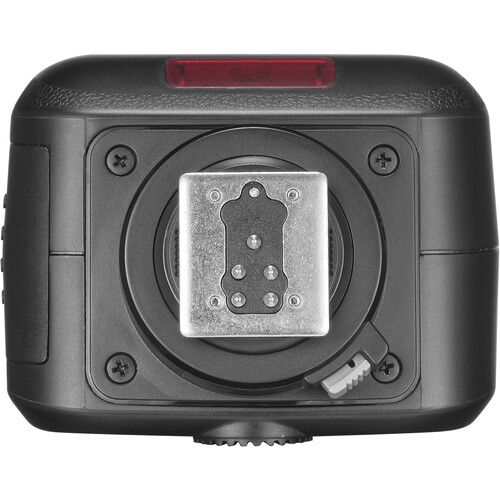
2、Gently lift the old foot (be careful of the ribbon cable inside).
3、Unplug the connector and plug in the new foot.
4、Screw it back in.
Problem solved!